![Leansoft Logo-Lockup-Primary Inverse (1).png]](https://support.learnsoft.com/hs-fs/hubfs/Leansoft%20Logo-Lockup-Primary%20Inverse%20(1).png?height=40&name=Leansoft%20Logo-Lockup-Primary%20Inverse%20(1).png)
The Learnsoft LMS supports the use of two basic kinds of Evaluations –
Class / Instructor Evaluations completed by students. (Evaluations can also be used by instructors to evaluate students in a class).
Performance Evaluations related to the Talent Management modules of the Learnsoft system, in which a manager or peer evaluates an employee
This guide will focus on the Class / Instructor Evaluations.
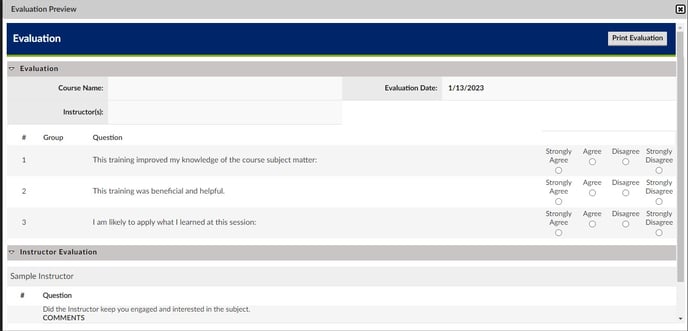
Screenshot of a sample Evaluation form is below:
There are 3 basic activities associated with evaluations:
Creation > Use > Reporting
Evaluation Creation: There are four basic steps to the Evaluation Creation Process:
- Create Ratings – Evaluation Answers and Scoring (see Working with Evaluation Rating types)
- Create Evaluations – Name the evaluation, select the evaluation type, associate default rating and select attributes.
- Create Evaluation Questions – After the evaluation is saved, specific questions to include in the evaluation form can be added and rating, scoring, comments and additional attributes selected.
- Apply Evaluations to Courses – At the course level, select the specific evaluation from a dropdown list of saved evaluations; at the instance level, select whether to make the evaluation mandatory.
Evaluation Use - From a user standpoint, the user needs to access, complete and save the evaluation.
Evaluation Reporting - Finally, the administrator, manager or instructor can view evaluation related reports.