![Leansoft Logo-Lockup-Primary Inverse (1).png]](https://support.learnsoft.com/hs-fs/hubfs/Leansoft%20Logo-Lockup-Primary%20Inverse%20(1).png?height=40&name=Leansoft%20Logo-Lockup-Primary%20Inverse%20(1).png)
One of the required fields for setting up a Learning Object is Catalog Tree. This allows the course to be associated within the catalog structure. Objects can be associated with one or more catalog nodes.
To associate a course to a catalog, navigate to the Learning Object from the Advanced View > Learning Objects > Courses
Click the name of a course to edit or select New from the Learning Object List to create a new learning object.
In the Catalog Tree field, click the + to the left of the category nodes to expand the tree. Once you locate the node, add a check to select the node.
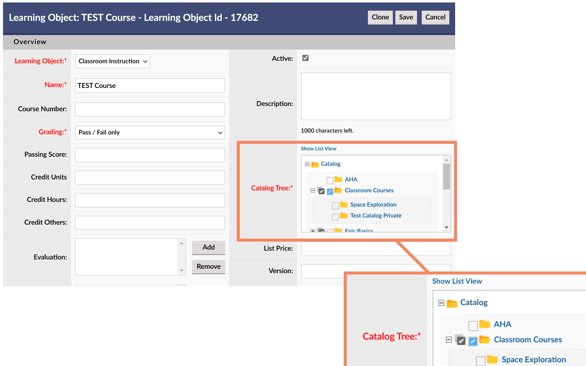
Save any changes for the Learning Object settings to take effect.
A quick way to view the catalog nodes a Learning Object is associated with is to click Show List View above the Catalog Tree field. This will open a box below with the list of catalog nodes.